

RS Multi-Camera Control Cable USB-C to Multi,for DJI RS4 Pro RS4 RS3 Pro RS3 Mini RSC2 RS2 Gimbal Stabilizer,for Sony Camera A6400 A6500 A6600 A7M3 A7M4 A7R3 A7R4 A7S3 A7S4 RX100VI RX100VII (UP)
Product details
| Management number | 239196648 | Release Date | 2026/07/14 | List Price | $6.80 | Model Number | 239196648 | ||
|---|---|---|---|---|---|---|---|---|---|
| Category | |||||||||
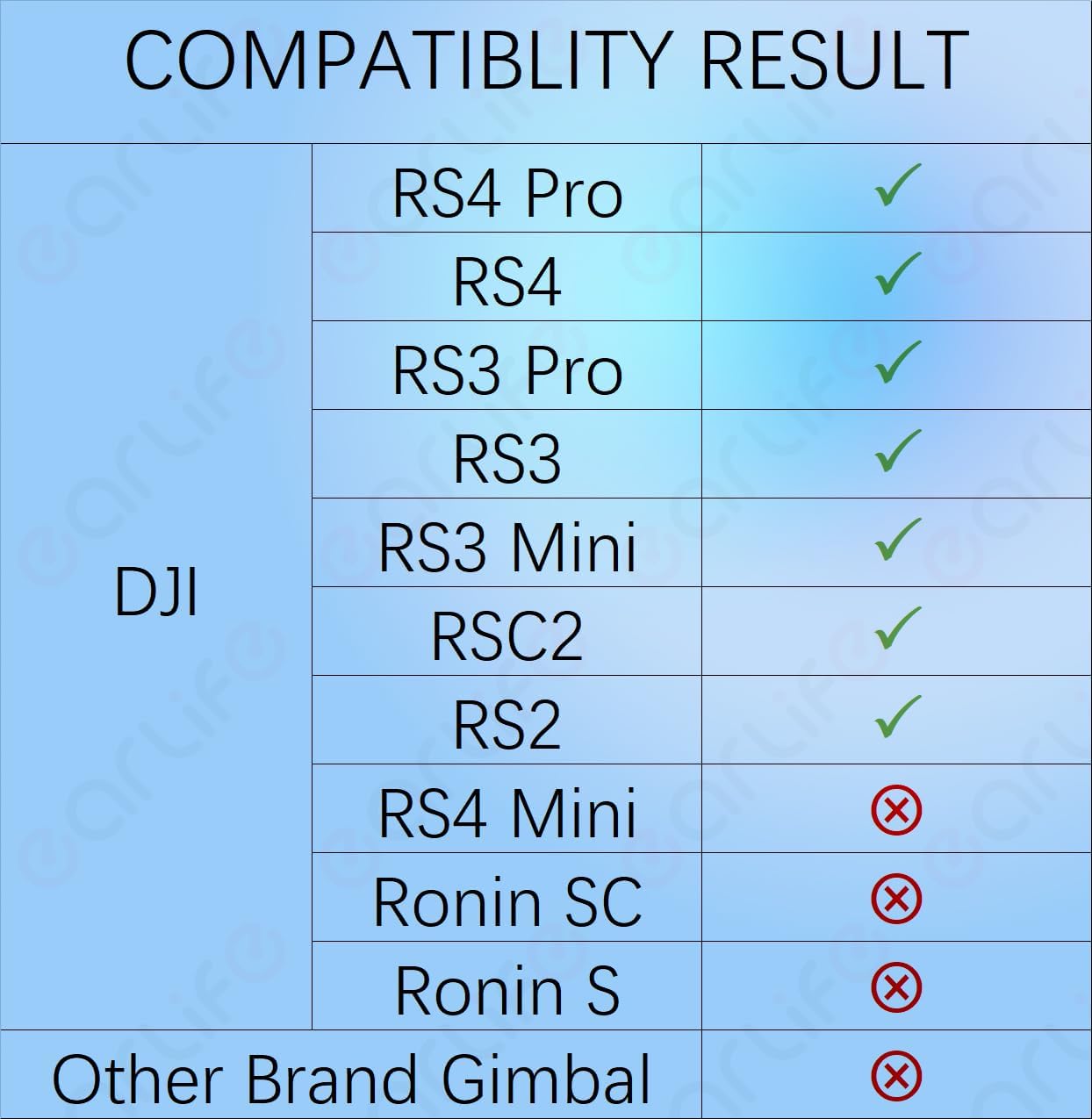
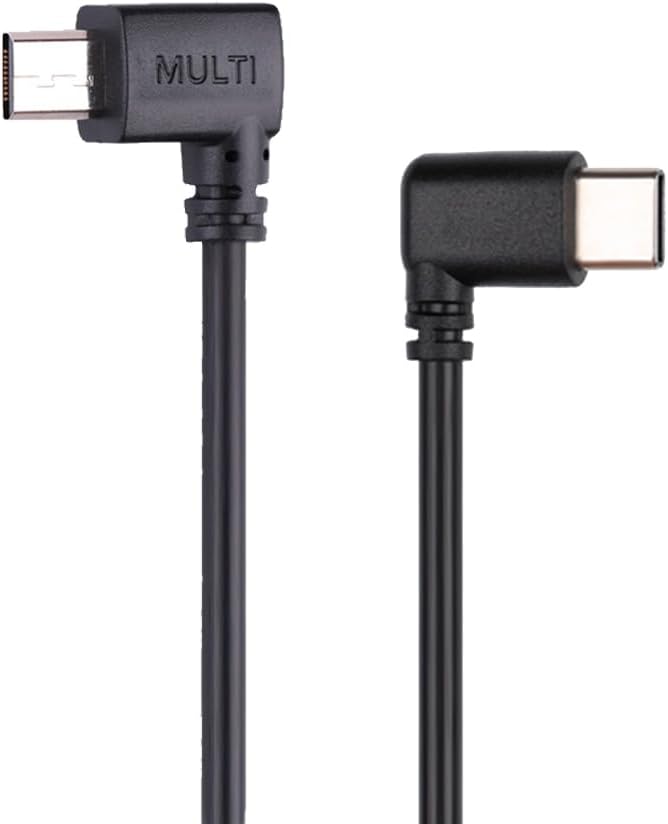
Professional Control Cable, Connect your DJI Ronin stabilizer (RSC2, RS2, RS3, RS3 Pro, RS3 Mini, RS4, RS4 Pro) & Compatible with Sony cameras via Multi port. Unlock advanced camera control directly from your gimbal. Key Functions ✓ Capture photos | ✓ Start/stop video recording ✓ Trigger autofocus | ✓ Digital/optical zoom control* ✓ RavenEye support | ✓ Ronin Image Transmitter support *Zoom functionality requires lens compatibility Compatibility Notice ▸ Stabilizers: Compatible with DJI Ronin RSC2, RS2, RS3, RS3 Pro, RS3 Mini, RS4, RS4 Pro ▸ Cameras: Compatible with SONY A1, A6000, A6100, A6300, A6400, A6500, A6600, A7M2, A7M3, A7M4, A7R2, A7R3, A7R4, A7R5, A7S, A7S2, A7S3, A9/A9II, ZV-1, FX3, FDR-AX100E, PXW-Z90V, RX100 VII ▸ If your specific camera or gimbal model isn't listed, this cable isn't compatible with it. ⚠️ Critical: Compatibility varies by model pair. Always verify support using our compatibility chart images before purchase. Technical Specs Color: Jet Black Material: Durable PVC Length: 13 inch / 33cm (exact) Connectors: USB-C ⇨ Multi Features ▸ Smart 90° Angled Design Space-Saving Fit: Precision-bent connector conforms to camera contours, preventing port obstruction Flexible Orientation: Choose Upward Bend or Downward Bend to clear adjacent ports Optimized Cable Routing: Reduces strain on connectors for stable operation User Guidance 1.Map Your Camera Ports & Match Bend Direction: → Examine side/rear port layout before purchase → Identify potential conflicts with HDMI/mic/power ports → Upward Bend: Ideal if control port is above other interfaces → Downward Bend: Choose if control port is below clustered ports ⚠️2. Functional Limitations This cable does not adjust aperture, shutter speed, or ISO Original cables also lack these controls ✅ Upgrade Option: For exposure control (aperture/shutter/ISO), choose our USB-C to USB-C Pro Control Cable Package Contents 1 × Control Cable Stabilizer & camera not included Setup Essentials Power sequence: Activate gimbal → then camera Zoom control: Optical zoom requires Power Zoom lens; Digital zoom: Set via Menu → Settings → Zoom Settings → Digital Zoom Cable swapping: Restart gimbal before switching cables HDMI playback: Monitor-only display during playback
- 【Control Cameras On-the-Move via Gimbal】 Connect your DJI RSC2/RS2/RS3/RS3 Pro/RS3 Mini/RS4/RS4 Pro stabilizers to cameras for real-time photo/video/zoom/autofocus control while walking. (MUST verify functional compatibility per paired model in chart images—even if both devices are listed.)
- 【 Compatible】Compatible with SONY camera: A1,A6000,A6100,A6300,A6400,A6500,A6600,A7M2,A7M3,A7M4,A7R2,A7R3,A7R4,A7R5,A7S,A7S2,A7S3,A9,ZV-1,A9 II,FX3,FDR-AX100E,PXW-Z90V,Rx100 VII (Compatibility varies by model pair. Always verify support using our compatibility chart images before purchase.)
- 【Multi controll Functions】Support Functions: (Depends on both Stabilizer and Cameras in your hand, see Compatibility Result in the picture): Capture photo,Start/stop recording video,Trigger auto focus,Zoom control(digital or optical),RavenEye,Ronin Image Transmitter.
- Smart 90° Angled Design, Upward Bend or Downward Bend options.
- 3.5mm OD and 33cm = 13 inch length, the best length for most stabilizers and cameras. High quality durable PVC material.
| UPC | 763769927796 |
|---|---|
| ASIN | B0BRKMRW1K |
| Color | Black - |
| Model | Typec-Multi-DJI-SONY-U |
| Brand Name | earlife |
| Cable Type | USB |
| Item Shape | Round |
| Model Name | Typec-Multi-DJI-SONY-U |
| Unit Count | 1.0 Count |
| Item Length | 13 Inches |
| Part Number | Typec-Multi-DJI-SONY-U |
| Manufacturer | CexoTech |
| Connector Type | Auxiliary, USB Type C |
| Item Type Name | Control cable. |
| Number of Pins | 24 |
| Outer Material | Polyvinyl Chloride (PVC) |
| Number of Items | 1 |
| Connector Gender | Male-to-Male |
| Compatible Devices | Camera, DJI RS4 Pro RS4 RS3 Pro RS3 Mini RS3 RSC2 RS2 Gimbal Stabilizer, Sony Camera A6400 A6500 A6600 A7M3 A7M4 A7R3 A7R4 A7S3 A7S4 RX100VI RX100VII |
| Included Components | Cable |
| Indoor Outdoor Usage | Indoor, Outdoor |
| Warranty Description | 1 year manufacturer |
| Customer Package Type | Protective packaging |
| Compatible Phone Models | DJI Gimbal Stabilizer RS4 Pro RS4 RS3 Pro RS3 Mini RS3 RSC2 RS2, Sony Camera A6400 A6500 A6600 A7M3 A7M4 A7R3 A7R4 A7S3 A7S4 RX100VI RX100VII |
| Connectivity Technology | USB |
| Recommended Uses For Product | Videography and photography with DJI stabilizers and Sony cameras |
| Other Special Features of the Product | Data Transfer |


Bestseller ranking
Soft & Plush Toys

Customers who viewed this product also viewed
Cables & Cords




Correction of product information
If you notice any omissions or errors in the product information on this page, please use the correction request form below.
Correction Request Form